SwansonX Asset Studio
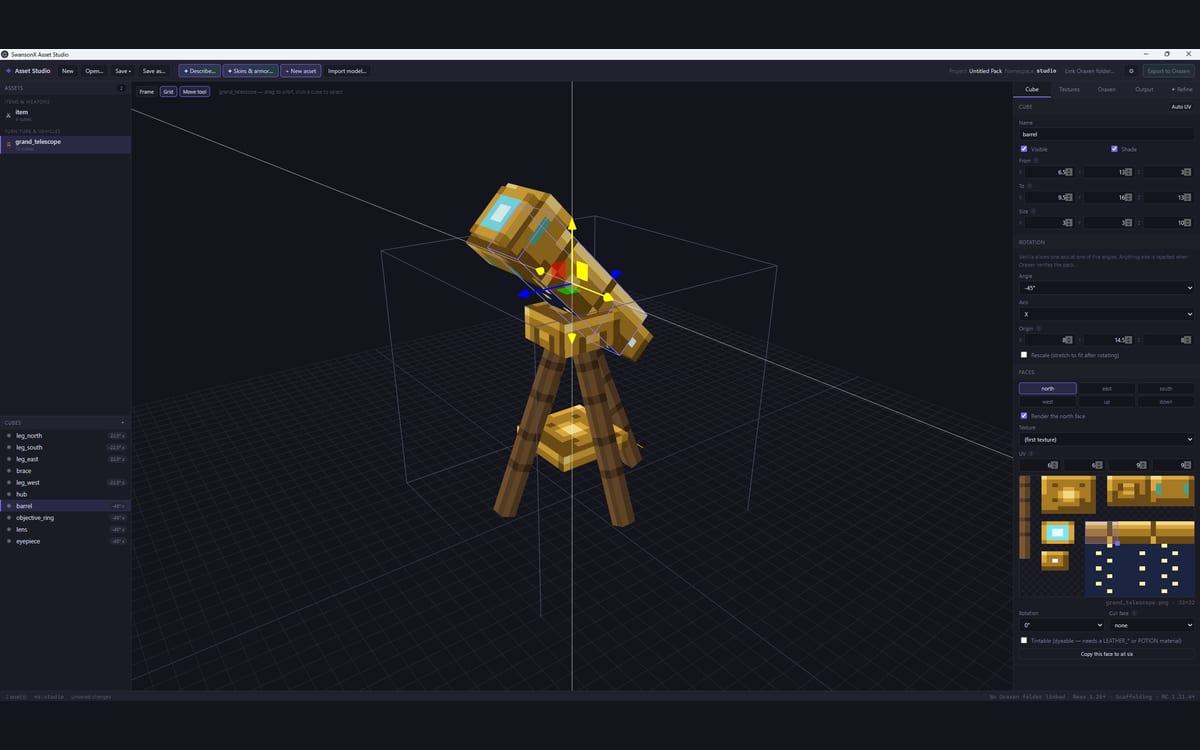
Build a custom game item in 3D, or bring in one you already made in Blockbench. Export it in the exact shape the game needs. Textures get made in the same window.
What it does
Model a weapon, a tool, a block or a piece of furniture in a real 3D view. Or import one you built in Blockbench. Either way, it exports in the exact shape the game needs to load it.
The hard part of custom Minecraft content is not the modeling. It is the config, and the config has to be right in four places at once. That is the part this handles.
Describe an item in one sentence and it comes back three ways: the shape, a pixel-art texture, and the config to install it. All of it is there to be edited by hand, not accepted as-is.
How I know it works
139 checks drive the export pipeline with no window open. Another 34 launch the real app and click through it.
The second set is the one that matters. A pipeline can be perfect while the button that starts it does nothing.